The app your team already has
Every adoption problem in team software comes from asking people to open something new. Bosun asks nobody to open anything. The assistant lives in WhatsApp, in a one-to-one chat with each person.
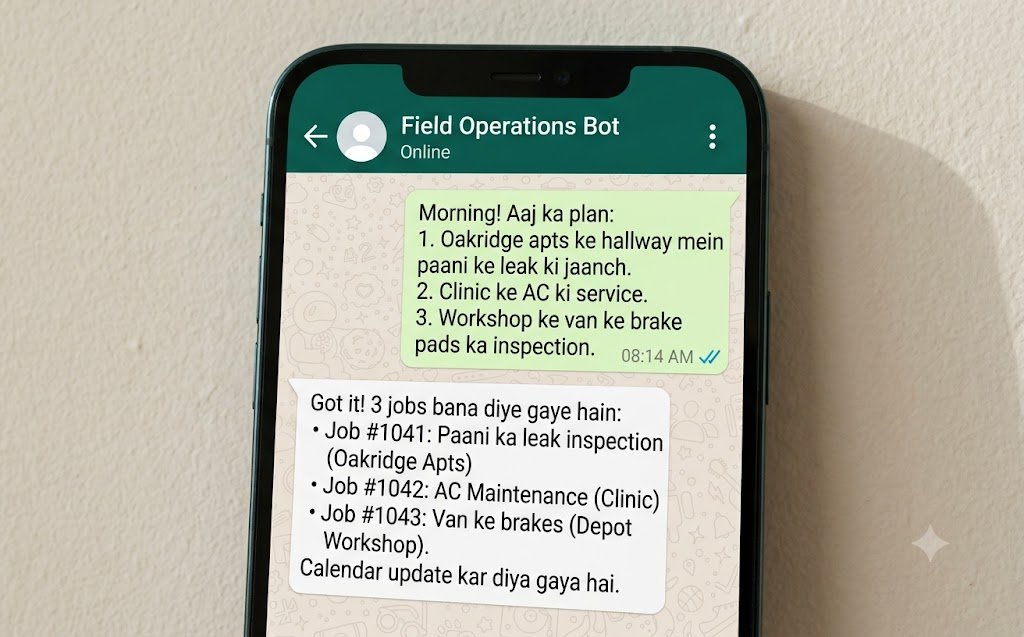
The assistant is a WhatsApp Business number your team messages like a colleague. Staff send their daily plan, report progress, ask what a written rule is, and get reminded when something is late - all in plain language, in one-to-one chats. There is nothing to install, no account to create and no syntax to learn.
- Channel
- WhatsApp Business, your own number
- Chats
- One-to-one with each person, not a group
- Language
- Plain, no commands
- Identity
- Their phone number
- Training needed
- A single message explaining it exists
What a staff member does
- Morning
- Types the day's plan
- During the day
- Asks what the rule is
- End of day
- Says what happened
- If late
- Gets a private reminder
- Anything else
- Nothing
Not in the group chat
Most teams already have a WhatsApp group, and it is exactly where work goes to die: a message scrolls past during a busy hour and everyone assumes somebody else picked it up. Adding an assistant to that group makes the noise worse, and it means somebody's late work gets announced to their colleagues.
So each person has their own thread. That is what makes a job traceable to a name, keeps a reminder private, and lets the assistant know who it is talking to without anyone signing in.
- Every job traces to one person, because every message did
- A reminder about late work is private, not a public nudge
- Your existing group chat carries on for everything else
- The owner sees all of it on the dashboard, which is where the overview belongs
Things worth knowing upfront
The official API
It runs on Meta's WhatsApp Business Cloud API - the supported route. No unofficial library, so no risk of your number being banned.
The 24-hour rule
Meta only allows free-form messages within 24 hours of somebody writing to you. Outside that window, reminders go as pre-approved templates - which is handled for you.
What messages cost
Replies inside the 24-hour window are free. Template reminders outside it carry Meta's fee, which varies by country - typically under a cent.
Your own number
The assistant uses your business's WhatsApp number, displaying your business name. Not ours.
Unknown numbers refused
A message from a number not on your roster is refused before anything is stored. It is not a support line for customers.
Any country
WhatsApp Business works worldwide. Working hours, time zone and the deadline language are set for where your team actually is.
First week, typically
- Day 1
- Owner messages the team
- Day 1-2
- Most people send a plan
- Day 3
- Reminders start landing
- Week 1 end
- The gaps in procedures show up
- Week 2
- The first weekly review
The rollout is one message
There is no training session, because there is nothing to teach. You send your team one message telling them the number exists and what to send it. People who have never willingly opened a piece of business software are using it the same afternoon.
If somebody sends something unexpected, the assistant answers helpfully rather than with an error - so the failure mode of getting it "wrong" is nothing at all.
- "Send what you're doing today. Tell it what happened at the end of the day. Ask it if you're not sure of a rule." - that is the whole briefing
- Test it first with the simulator, which sends nothing to anybody
- Nobody can break anything: staff can only change their own work
- The dashboard shows you who has actually started using it in the first week
The other surfaces
On this page
Does it use an unofficial WhatsApp library?
No, and this matters. Tools built on whatsapp-web.js or Baileys break WhatsApp's terms and get numbers banned. Bosun uses Meta's official Cloud API, which is the only route that is safe for a business number.
What is the 24-hour window?
Meta lets a business send free-form messages only within 24 hours of the customer - here, your staff member - messaging it. Outside that, messages must use a template Meta approved in advance. Bosun tracks each person's window and picks the right kind automatically, so you never see a failed send.
Can staff use it on a personal phone?
Yes, and most do - that is why adoption is not a problem. If you would rather not have work on personal phones, that is a policy question for you rather than a technical one.
What if somebody messages it at midnight?
It answers them - they chose to. The working-hours limit governs what the assistant initiates, not when people may write to it.