The whole business, on one screen
Today ordered by what needs deciding, every job with its full history, every person's thread, your procedures, and the weekly review. On a laptop at the desk or a phone on the forecourt.
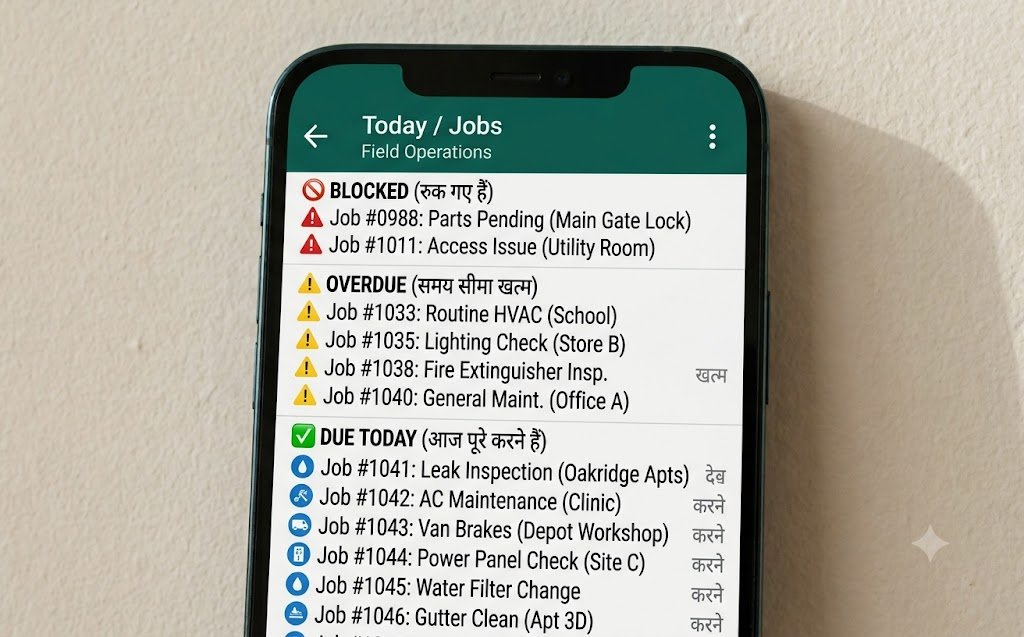
The dashboard is the web surface for owners and managers. It opens on today - blocked work first, then overdue, then due today, then who has not reported - and from there covers every job with its complete change history, every person and their message thread, the procedures the assistant answers from, the questions it could not answer, the weekly review and every setting.
- Who uses it
- Owners and managers
- Opens on
- Today, ordered by what needs you
- Also holds
- Jobs, people, messages, procedures
- On a phone
- Yes - tested at 390px
- History
- Every change, never deleted
What is in there
Today
Blocked, overdue and due today, with who has not reported. The screen you would keep open.
Jobs
Every job, filterable by person, department, status and date, each with its complete history.
People
Your roster - names, numbers, roles and departments - and what each person is carrying.
Messages
Every message in and out, and what the assistant decided each one meant. The place to check its judgement.
Procedures
Your documents, plus the ranked list of questions nobody had written an answer to.
Meetings
Decisions with their reasons, open questions, and the jobs each meeting produced.
Weekly review
This week against last, per person and per department, with what is worth fixing.
Simulator
Send a test message as any person and watch what happens, without messaging anybody.
Settings
Credentials, branding, departments, working hours and reminder timings - all yours.
Tested before release
- Automated checks
- 716
- Real-browser checks
- 79
- Screens covered
- Every one
- Phone width tested
- 390px
- Console errors allowed
- Zero
Checked on a phone, because that is where you are
Owners of the businesses this is built for are not at a desk. They are on a forecourt, in a workshop, between two sites. A dashboard that only works on a 27-inch monitor is a dashboard that gets checked once a week.
So every screen is tested at 390 pixels wide in a real browser before release, not merely declared responsive. That testing is also how we caught a sidebar that overflowed on a narrow phone - a bug no amount of code review had found.
- Every screen checked in a real Chrome at phone width before release
- The navigation collapses to an icon rail on narrow screens automatically
- No horizontal scrolling anywhere, which is asserted by the test suite
- Dark and light both supported, following whatever your phone is set to
One job's history
- Created
- From a WhatsApp plan
- Reminded
- Twice, privately
- Blocked
- "waiting on parts"
- Owner told
- Same morning
- Closed
- From the spreadsheet
Nothing is ever deleted
Every job carries its whole history: created from which message, assigned to whom, moved to blocked with what reason, closed by whom and when. A status changed from the Google Sheet says so. A change made in the dashboard says who made it.
This is what makes the tool usable in a disagreement six weeks later, which is the moment a job list either earns its keep or does not.
- The original message that created each job, kept verbatim
- Every status change with its time, source and reason
- Every reminder sent, and which attempt it was
- Whether the change came from WhatsApp, the dashboard or the spreadsheet
The other surfaces
On this page
Do managers see everything the owner sees?
Almost. Managers can assign work and pull every report; only owners can change the system settings and credentials.
Can I edit jobs directly in the dashboard?
Yes - create, reassign, change a deadline, change a status, add a note. Every edit is recorded with who made it, like any other change.
Is there a mobile app for the dashboard?
No, and deliberately - it is a web dashboard that works properly on a phone browser. An app would be a second thing to install and update for no benefit.