The state of the day, in one message
Blocked work that needs a decision, then what is overdue, then what is due today, then who has not reported yet. Ordered by what needs you, not by when it was created.
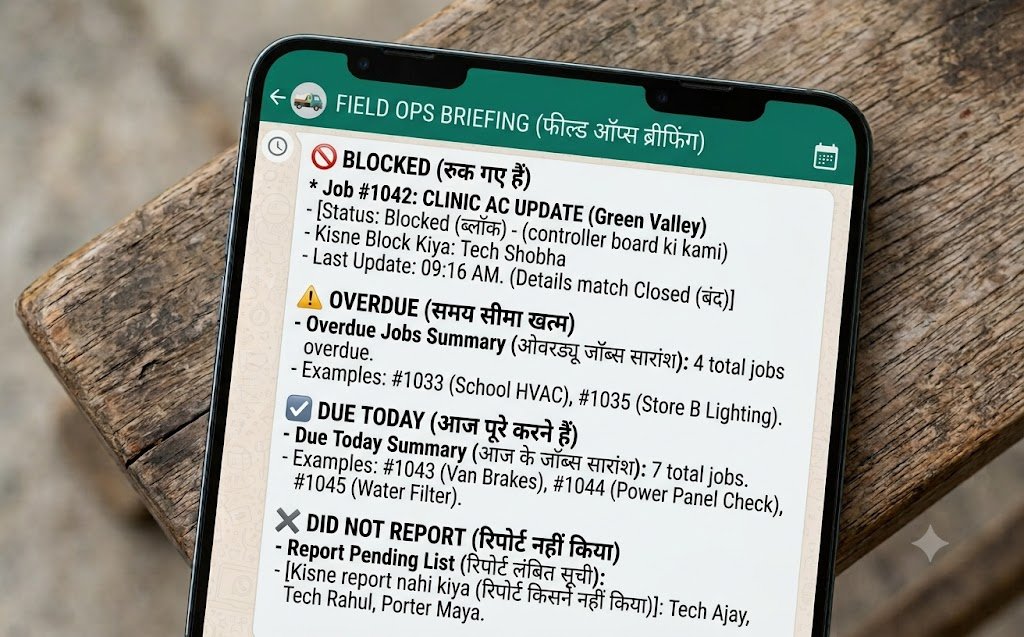
The owner briefing is a prioritised summary of the business's open work, sent on request or on a schedule. It leads with blocked work because that needs a decision, then overdue, then what is due today, and closes by naming anyone who has not sent an update. The figures come from the database rather than being written by a model, so the counts always agree with the job list.
- Order
- Blocked, overdue, due today
- Also shows
- Who has not reported
- On request
- Ask for it any time
- On schedule
- Each morning, if you want
- Who can ask
- Owner and managers only
In plain English, or a shortcut
Today's priorities
"What should I focus on this morning?" Blocked first, then overdue, then due today.
What is late
"Anything slipping?" Everything overdue, grouped by the person responsible.
One person
"How is Ravi getting on?" Their open work, what they closed, what they are stuck on.
One department
"How is parts looking?" The same, scoped to a department you defined.
One job
A reference number returns that job with its full history - who changed what, and when.
Anything, by name or number
"Anything on 4471?" returns every open job matching it, who has each one, and what anything blocked is waiting on. The question an owner actually asks from the forecourt.
The week
"How did the week go?" Created, closed, what grew, and what to do about it.
A briefing, in order
- 1. Shape of the day
- Counts in one line
- 2. Needs a decision
- Blocked, with reasons
- 3. Overdue
- By person
- 4. Due today
- By person
- 5. Not reported
- Names
The numbers come from the database
A briefing is only useful if the owner trusts it. Numbers produced by a language model are plausible rather than certain, and a count that is quietly wrong is worse than no count - it gets acted on.
So the model is used to understand the question, and the answer is then built from the data by ordinary queries. The briefing's overdue count is checked against the job list on every release, because a report that disagrees with the list it summarises is worse than no report.
- Counts, lists and totals come from the database, every time
- The model interprets the request; it does not write the figures
- The briefing's overdue count is asserted against the job query in the test suite
- Nothing is softened - an unpleasant number is reported as it is
More of the assistant
On this page
Can staff ask for the briefing?
No. Reports and team-wide questions are owner and manager only, and that is enforced in the code rather than asked for in a prompt. A staff member who asks is told plainly, and the refusal contains no data.
Can I get it automatically each morning?
Yes. Set a time in the admin and it arrives on WhatsApp, and by email too if you switch that on.
What if somebody claims to be the owner?
Identity is the phone number checked against your roster, not anything the message says. A message claiming owner privileges is refused - that specific attempt is one of the tests run before every release.